How it works
A self-contained C app runs on the reMarkable and drives the e-ink directly through rm2fb. It reads your pen, and when you pause it writes the answer onto the page in flowing Dancing Script — no xochitl, no cluster, no page reload.
Live ink
Reads the Wacom pen and draws your strokes straight to the panel.
Capture
On a short pause it grabs the page as a PNG — in-app, on the tablet.
Transcribe
gpt-5.5 vision reads your handwriting to text, so any model can answer.
Your model
The selected model replies — text, a flowchart, or a sketch — via agentgateway.
Write it
Rendered onto the e-ink in cursive, letter by letter.
Gestures: tap the top-right to switch models · tap the top-left to save the page to your library · flip the marker to its eraser end + tap to clear and start fresh · ask it to “diagram X” for an auto-laid-out flowchart.
Your pen in. A cursive answer, in your model’s voice, written back on the page.
Tap to switch models
A bar at the top shows the active model; tap the top-right corner to switch (and the top-left to save the page to your library). Every call goes through your agentgateway (keys in Vault, traced in Langfuse). gpt-5.5 always reads the handwriting; the model you pick does the thinking — so even text-only models work.
OpenAI · gpt-5.5
Frontier multimodal — also the shared “eyes” that read every page.
:30160 /openaiAnthropic · Claude
claude-fable-5 — warm and sharp, one tap away on the same page.
xAI · Grok-4.3
Grok’s take on the same question, routed through the gateway.
:31397 /grokLocal · Qwen3.6
Runs on your own DGX Spark — no cloud. Private model, on-paper ink.
:31944 /sparkAsk your agents
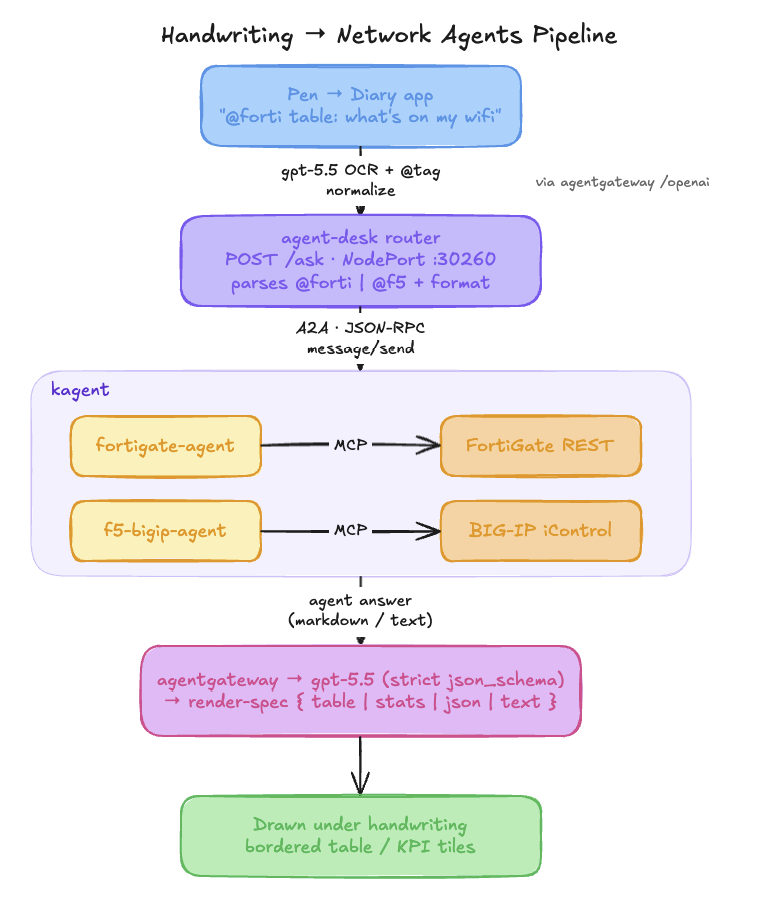
Beyond chat — write @forti or @f5 and the page answers with live data from your infrastructure. The tag routes your question to a real kagent agent running in the cluster, which talks to the firewall or load balancer, and the reply lands as a table or stat tiles drawn under your handwriting.
Pick an agent
Start the line with @forti or @f5. A second word picks the shape: table:, stats:, json:, text:.
agent-desk
The diary POSTs the transcribed line to a thin in-cluster router. gpt-5.5 normalizes the handwritten tag, so @ Forti still routes.
kagent
agent-desk calls the FortiGate / F5 agent over A2A (JSON-RPC). Each agent owns the device API through its MCP tools.
render-spec
gpt-5.5 (through agentgateway, schema-constrained) folds the agent's answer into a strict table / stats / json / text spec.
Draw it
Rendered under your question — a bordered grid or KPI tiles, in a crisp metric font.
FortiGate → table
@forti table: what devices are on my wifi → device inventory, DHCP leases, wireless clients — hostname, IP, AP, band, signal.
F5 BIG-IP → stats
@f5 stats: list LTM pools with member status → pools, members up/down, VIPs and LB method as KPI tiles.
Defaults: @forti → table, @f5 → stats — override per question with a format word. Every hop (the OCR, the render-spec shaping) runs through agentgateway; the A2A call reaches the kagent agent in-cluster. Keys in Vault, traces in Langfuse.
Handwrite a question to your firewall. Read the answer as a table on the same page.
Architecture
The app lives on the tablet and calls your agentgateway directly over Wi-Fi — keys in Vault, every question traced in Langfuse. Nothing to inject, nothing in the cluster to babysit.
  reMarkable 2  (OS 3.22 · rm2fb drives the e-ink)
   pen ─► [ diary ] app  ─►  capture page → PNG
                        │  Wi-Fi · agentgateway NodePorts (HTTP)
                        ▼
   ┌─────────────── agentgateway ───────────────┐
   │  gpt-5.5 reads the handwriting → text            │
   │  selected model answers → text / flowchart      │
   │  key from Vault (ESO) · traces → Langfuse       │
   └──────────────────────────────────────────────────┘
     OpenAI · Claude · Grok · local Qwen (DGX Spark)
                        │
                        ▼
   answer written to the e-ink in cursive (letter by letter)
Your pen in. A cursive answer, in your model’s voice, on the page.
Built on
One self-contained binary on the tablet; the only off-device dependency is your gateway.
rm2fb
The rM2 has no usable framebuffer — rm2fb (timower/rM2-stuff) drives the e-ink so the app can paint it directly. Needs OS ≤3.22, so the tablet was downgraded 3.27 → 3.22.4.2 (3.27 kept as fallback).
On-device app (C)
Pen via evdev, direct framebuffer draw, page capture to PNG, HTTP to the gateway, and mermaid-style flowchart auto-layout. Cross-compiled for armv7, zero runtime deps.
diary.c · toltec toolchainagentgateway
The app hits OpenAI-compatible routes on NodePorts; the gateway injects each key and records the trace. Swap models without touching the tablet.
/openai · /anthropic · /grok · /sparkstb_truetype + Dancing Script
Answers are rendered glyph-by-glyph in a real cursive font — smart punctuation normalized to ASCII so nothing renders as a box.
92px · A2 waveformstb_image_write + cJSON
The page is captured to PNG for the vision call; the model’s JSON reply (text or a nodes+edges graph) is parsed in-app.
framebuffer → PNG · JSON → flowchartLangfuse
Because every answer is a gateway call, each “question” is a trace — latency, tokens, and cost, like any other lab workload.
observability, for freeSetup
For the on-device app — reMarkable 2, OS ≤ 3.22 (3.27 kept as a fallback partition):
Downgrade to OS ≤ 3.22
rm2fb only supports ≤3.22, so flash 3.22.4.2 to the spare A/B partition and mask auto-update. Manual rootfs dd — the clean updater path fails on 2026 firmware.
Install rm2fb
Place rm2fb_server + the client lib on the tablet (timower/rM2-stuff v0.1.4). It drives the e-ink once xochitl is stopped.
Build the app
Cross-compile diary.c for armv7 with the toltec toolchain; copy the binary and a handwriting font (diary-font.ttf) to the tablet.
Run it
sh diary-start.sh stops xochitl and starts rm2fb + the diary. diary-stop.sh returns to the normal reMarkable UI.
Configuration
Everything is set in diary.c — the MODELS[] table plus a few tunables:
| Setting | Purpose | Value |
|---|---|---|
| MODELS[] | Tap-to-cycle list — label · NodePort · path · model | 4 entries |
| OCR model | Reads the handwriting for every model | gpt-5.5 · :30160 /openai |
| Gateway host | agentgateway node address (NodePorts) | 172.16.10.155 |
| Font | Cursive typeface + size on the e-ink | Dancing Script · 92px |
| Idle trigger | Pause after writing before it answers | ~2.5s |
| Switch model | Tap to cycle the active model | top-right corner |
| Save page | Tap to write the page to your library as a PDF | top-left corner |
| Clear page | Gesture to wipe and start fresh | eraser end + tap |
Model endpoints are the agentgateway NodePorts listed in the Models section — plain HTTP; the gateway injects the keys.
Built & proven
Running on the real device today — validated end-to-end.