How it works
A self-contained C app runs on the reMarkable and owns the e-ink through rm2fb. It boots into a Home launcher; Write is a tall multi-page canvas. When AI is on, a pause after ink OCRs your handwriting and draws the answer back in typewriter or cursive — no xochitl reload while you’re in the shell.
Vector ink
Pen strokes and shapes stored as data — pan and zoom stay crisp.
Finger
One finger pans; two-finger pinch zooms. Pen stays for drawing.
OCR
gpt-5.5 vision reads the page when AI is on and you pause.
Your model
Selected model answers — text, flowchart, markmap — or agent-desk for @tags.
Render
Special Elite or cursive on the e-ink; stamps and answers as bitmaps on the canvas.
AI off = free writing. AI on = auto-answer after idle (Settings: 4s / 6s / 10s). Footer: page nav · model chip · AI toggle. Menu: tools, stamp, move stamp, save, clear, delete page.
Write. Draw. Stamp. Ask your cluster — on paper.
Shell & canvas
Not just a single page — a small OS that owns the device until you Exit to reMarkable.
Home launcher
Write, Library, Settings as primary cards; Sleep and Exit as soft links. Boots via systemd watchdog.
SebbyCorp Notepad · from diary OSMulti-page notebook
Page nav, add page, delete page. Each page is a tall vector canvas (3× screen height) with pan/zoom.
persist · diary-nb/notebook.dnbTools & stamps
Pen, rect, oval, tri, line, arrow · solid/dashed/dotted · logo stamps from diary-stamps/. Drag stamps with finger or pen; menu Move stamp mode.
Settings
Model, answer size/font, auto-ask delay, screen sleep — label left, value right. Saved to diary.conf.
Library
Browse saved “AI diary” PDF pages without leaving the shell.
in-app list · open viewerUI chrome
Top: menu · active tool chip · date · battery. Footer: pages · model · AI. Left rail for tools and page actions.
Special Elite UI fontModels on the footer
Tap the model chip next to AI on/off to cycle. gpt-5.5 always reads the handwriting; the model you pick does the thinking — so text-only backends work. Every call goes through your agentgateway (Vault keys, Langfuse traces).
OpenAI · gpt-5.5
Frontier multimodal — also the shared “eyes” that OCR every page.
:30160 /openaiAnthropic · Claude
claude-fable-5 — warm and sharp, one tap on the footer chip.
xAI · Grok-4.5
Grok’s take on the same question, routed through the gateway ($2/$6 per 1M in cost catalog).
:31397 /grokGoogle · Gemini
gemini-2.5-flash via dedicated gateway — same OpenAI-compatible client shape.
Local · Qwen3.8
Runs on your own DGX Spark — no cloud. Private model, on-paper ink.
:31944 /sparkAsk your agents
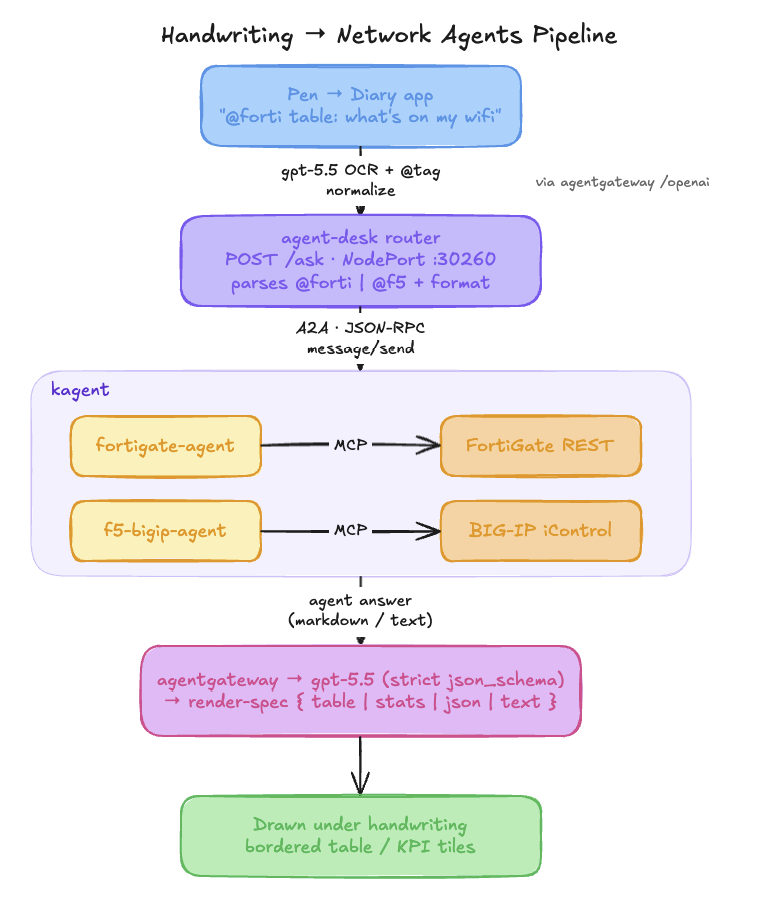
Write @forti, @f5, @k8s, or @agw and the page answers with live data from your infrastructure. Tags route through agent-desk to kagent agents (A2A + MCP), then land as tables, stats, or markmaps under your handwriting. Follow-ups stay in the same thread — ask, then ask about the answer.
Pick an agent
Start with @forti, @f5, @k8s, or @agw. Optional format: table:, stats:, map:.
agent-desk
Diary POSTs the OCR text to the in-cluster router. Handwritten tags are normalized.
kagent
agent-desk calls FortiGate / F5 / KubeAssist agents over A2A; tools via MCP.
render-spec
gpt-5.5 coerces the answer into table / stats / json / text / markmap.
Draw it
Grid, KPI tiles, or mind map under your question.
FortiGate → table
@forti table: devices on my wifi → inventory as a bordered grid.
F5 BIG-IP → stats
@f5 stats: LTM pools → members and VIPs as KPI tiles.
Kubernetes → map
@k8s map: kagent namespace → live markmap of workloads and services.
agentgateway → observe
@agw rejected requests · @agw cost by model · @agw which policy masked bruce wayne — the gateway inspecting itself.
@agw — ask agentgateway about itself
A read-only inspector over your own gateway. Config from the Kubernetes API; runtime traffic, cost, and per-request logs from the ClickHouse telemetry warehouse; masking attribution from live promptGuard policies.
Config & health
@agw are any routes not programmed? — gateways, HTTPRoutes, backends, policies and their status.
Enforcement
@agw show rejected requests — 401/403 auth, 429 rate-limit, errors, and budget outcomes, with reasons.
Cost & tokens
@agw spend last 30 days — USD and in/out tokens by model, route, or total.
Logs & trace
@agw last requests to /openai → individual rows with a trace id, then drill into every span of one request.
Masking attribution
@agw which policy masked it? → the promptGuard policy, its Mask pattern, and the route it’s attached to (e.g. (?i)bruce\s+wayne on openai).
Ask, then follow up
agent-desk threads on the A2A context, so @agw remembers the last answer for a natural follow-up.
Read-only. Per-request mask events aren’t in telemetry yet — @agw attributes masking from policy config, naming the policy that would mask that content and where.
Handwrite a question to your cluster. Read the answer on the same page.
Architecture
The shell lives on the tablet and calls your agentgateway over Wi-Fi — keys in Vault, every question traced in Langfuse.
  reMarkable 2  (OS 3.22 · rm2fb · SebbyCorp Notepad)
   pen / finger ─► [ diary ] shell
        Home · Write (vector pages) · Library · Settings
        stamps · pan/zoom · model chip · AI on/off
                        │  Wi-Fi · agentgateway NodePorts
                        ▼
   ┌─────────────── agentgateway ───────────────┐
   │  gpt-5.5 OCR → selected model answer           │
   │  agent-desk → @forti / @f5 / @k8s / @agw (A2A) │
   │  key from Vault · traces → Langfuse           │
   └──────────────────────────────────────────────────┘
     OpenAI · Claude · Grok · local Qwen (DGX Spark)
                        │
                        ▼
   ink + bitmaps on canvas · persist diary-nb/ · save PDF
Built on
rm2fb
Drives the e-ink so the app paints directly. Needs OS ≤3.22 (3.22.4.2; 3.27 kept as fallback).
SWTCON · v0.1.4diary.c
Shell, vector canvas, stamps, touch, HTTP, renderers — one armv7 binary, zero runtime deps beyond rm2fb + fonts.
toltec · Special Elite UIagentgateway
OpenAI-compatible routes on NodePorts; injects keys, records traces. Swap models without flashing the tablet.
/openai · /anthropic · /grok · /gemini · /sparkagent-desk
Thin router for @forti / @f5 / @k8s → kagent A2A → render-spec back to ink.
stb + cJSON
PNG capture, TrueType, JPEG stamps, JSON parse for flow / markmap / agents.
stb_truetype · stb_imageLangfuse
Every answer is a gateway call — latency, tokens, cost like any other lab workload.
observabilitySetup
reMarkable 2, OS ≤ 3.22 (3.27 on the fallback partition):
Downgrade & rm2fb
Flash 3.22.4.2, install rm2fb_server + client lib (timower/rM2-stuff). Mask auto-update.
Build & deploy
cd remarkable-diary/takeover && ./build.sh && ./deploy.sh 172.16.10.175 ./id_diary — fonts, binary, systemd unit.
Stamps (optional)
Copy PNGs to /home/root/diary-stamps/ (e.g. logo.png). Menu → Stamp inserts at 50×50; drag to place.
Boot into Notepad
diary.service watchdog starts the shell on boot. Exit to reMarkable restores xochitl.
Configuration & paths
| Item | Purpose | Value / path |
|---|---|---|
| MODELS[] | Footer + Settings cycle list | gpt5.5 · claude · grok4.5 · qwen |
| OCR | Always reads handwriting | gpt-5.5 · :30160 |
| Gateway | agentgateway node | 172.16.10.155 |
| AI idle | Auto-ask delay when AI on | 4s / 6s / 10s (Settings) |
| Settings file | Persisted prefs | /home/root/diary.conf |
| Notebook | Strokes + bitmaps | /home/root/diary-nb/notebook.dnb |
| Stamps | Logo / diagram stickers | /home/root/diary-stamps/*.png |
| UI font | Shell + chrome | diary-menu.ttf Special Elite |
| Answer font | Cursive path | diary-font.ttf |
Model endpoints are the agentgateway NodePorts above — plain HTTP; the gateway injects keys.
Built & proven
Running on the real device — SebbyCorp Notepad as the daily takeover shell.